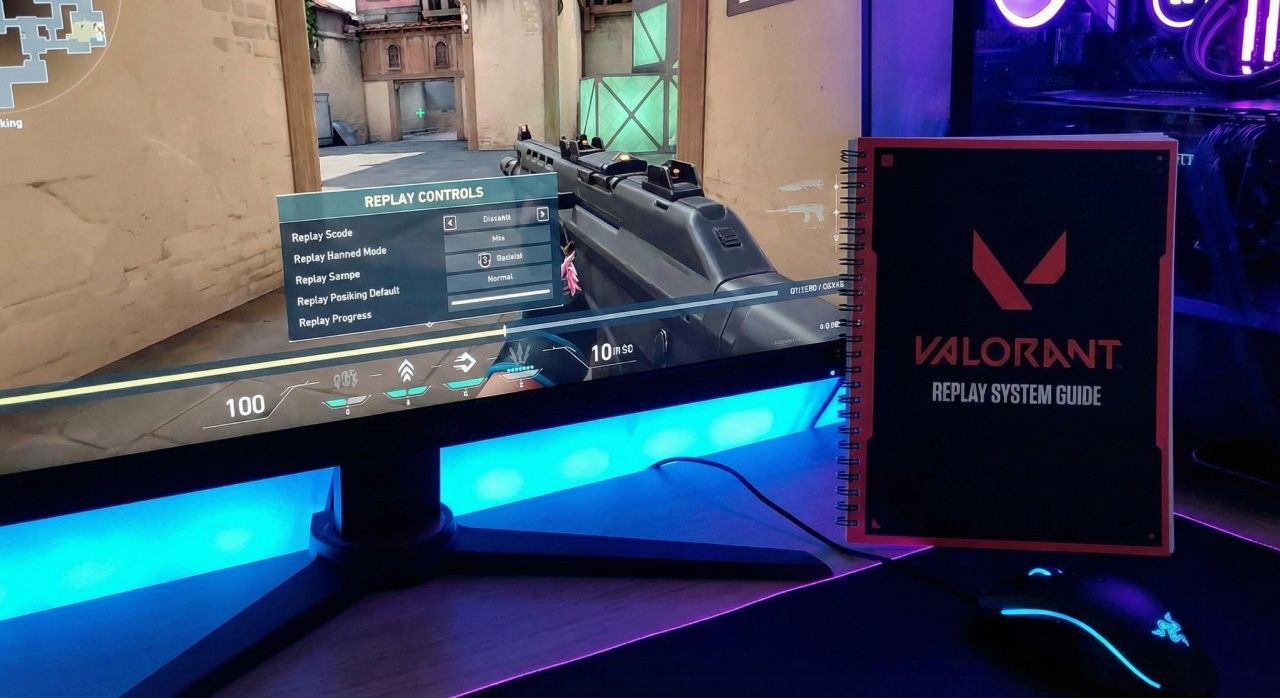
Essential Valorant Replay System Guide
Why did Riot Games wait five years to give players the replay feature they desperately wanted in Valorant?
The Valorant replay system arrived with patch 11.06. It changed how players analyze and improve their gameplay. Now, users can watch games from any player's view, track abilities, and study key decisions.
Riot Games showed the replay system's prototype in May 2024. It had bugs like Ascent's bomb doors not closing. The replay system officially launched in May 2025. It started with Competitive matches and then added Unrated, Swiftplay, and Premier modes in all regions.
The rollout was staggered by region. Chinese players got it on October 9 with patch 11.07b. Console users got it on November 11-12, depending on their location. This allowed Riot Games to make adjustments based on feedback.
The replay tool lets players analyze their games deeply. This was only possible with third-party software before. Now, players can review matches without slowing down their gameplay. This makes it easier to find mistakes and learn from pros.
Key Takeaways
- The Valorant replay system launched officially in May 2025 with patch 11.06
- Players can view matches from any participant's perspective with full ability tracking
- The feature supports Competitive, Unrated, Swiftplay, and Premier game modes
- Console players received the replay system on November 11-12 with patch 11.10
- China gained access earlier on October 9 through patch 11.07b
- The system eliminates the need for third-party recording software that impacts game performance
Understanding the Valorant Replay System
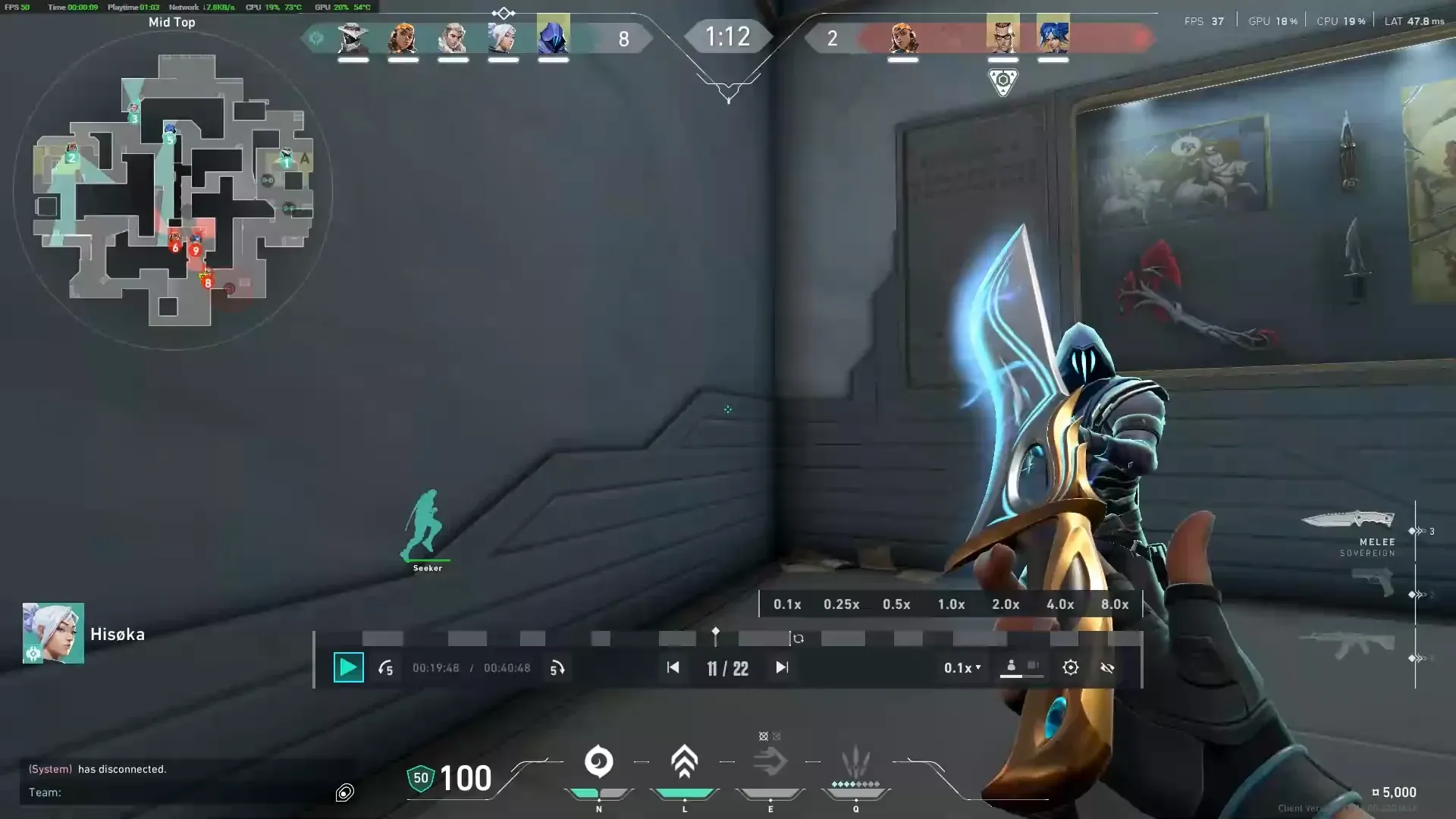
The Valorant replay system changes how we analyze matches. It gives players tools to review their gameplay. This guide helps players improve by showing how to use the replay feature.
What Are Valorant Replays
Valorant replays are recordings of every match. Players can see the game from different angles. They can watch from the player's view or use a free camera for strategy.
Every detail of gameplay is recorded. This includes player movements and ability use. Players can see parts of the game they missed live.
Core Features and Capabilities
The replay system has tools for analysis. Players can see outlines of friends and foes through walls. A timeline shows important moments like kills and ultimate abilities.
Players can track abilities like Sova's Recon Darts. Combat reports are available for damage details. This makes reviewing matches easy and detailed.
System Requirements and Compatibility
For smooth replay playback, certain hardware is needed:
| Component | Minimum Requirement | Recommended |
|---|---|---|
| Frame Rate | 60 FPS | 144+ FPS |
| Storage Type | HDD | SSD |
| Free Space | 20 GB | 50 GB |
| Platform Support | PC (Global) | PC + Console (Patch 11.10) |
How to Access and Download Replays
Players can now find match recordings in the game client. This feature lets them review matches, analyze decisions, and capture moments. It's easy to start with replays through the main interface.
Finding Your Match History
The Career page is where you find past matches. Look for the Replay icon next to each match. Not all game modes have replays, but competitive matches from the current patch are available.
Matches from the last 10 games are shown. This makes it simple to find recent games.
Downloading Replay Files
After picking a match, the download starts. It takes 30 to 60 seconds, depending on the match length. Make sure to download before switching patches, as older versions won't work with new ones.
Each replay file has full match data. This includes all player views and ability use.
Storage Location and File Management
Replay files go to a special folder in the Valorant directory. The default path is in the game's local data folder. Files stay there until you delete them.
Keeping your system running smoothly is important. Each replay uses about 15-25 MB of space. You can organize files in custom folders for different match types or special games.
Available Game Modes for Replay Recording
The Valorant replay system roadmap now includes many game modes. Players can record and review their matches in different ways. This lets them analyze their gameplay in both competitive and casual settings.
Many core game modes are supported by the replay feature. Players can record matches in Unrated, Competitive, Swiftplay, and Premier modes easily. The system saves these matches for later viewing after a game ends.
| Game Mode | Recording Status | Special Requirements |
|---|---|---|
| Unrated | Fully Supported | None |
| Competitive | Fully Supported | None |
| Swiftplay | Fully Supported | None |
| Premier | Fully Supported | None |
| Custom Games | Supported (v12.00+) | Party leader must enable |
| VCT Tournaments | Not Supported | N/A |
Custom games got recording in patch v12.00, a big step for Valorant. Party leaders must turn on recording in Custom lobby settings before playing. But, professional tournament matches, like VCT events, can't be recorded. Voice chat and text messages are not recorded to keep player privacy safe.
Navigating the Replay Interface
The valorant replay interface gives players full control over their viewing. It has easy-to-use tools and many viewing options. Players can see matches from all sides.
It has visual markers and controls for playing back games. This makes reviewing games simple and useful.
Player Perspective Controls
Players can see all ten players' views in any replay. The number keys 1 through 0 let you jump to any player's view. Pressing V switches between first-person and free camera modes.
This lets players see how players position themselves. The free camera mode shows team movements and site plans.
Timeline Navigation and Markers
The timeline shows key events with clear signs. Icons mark eliminations, deaths, and ultimate uses. Clicking on a marker takes you to that moment.
The navigation bar controls let you skip forward or backward. The gear icon opens settings for timeline preferences.
Speed Control Options
Adjusting playback speed helps focus on certain moments. The valorant replay system has seven speeds:
| Speed Setting | Best Use Case |
|---|---|
| 0.1x | Frame-by-frame analysis |
| 0.25x | Studying precise aim mechanics |
| 0.5x | Reviewing ability timing |
| 1x | Normal playback |
| 2x | Quick round reviews |
| 4x | Skipping through eco rounds |
| 8x | Finding specific moments |
The spacebar starts and pauses playback at any speed. These controls help analyze games efficiently.
Advanced Viewing Features and Settings
The replay system offers powerful viewing options. These options give players deeper insights into matches. Since the valorant replay system release date, players have gained access to enhanced controls.
Wall Hack Outlines and Enemy Visibility
Players can toggle enemy and friendly outlines. This reveals crucial positioning information during replay analysis. The minimap shows all enemy positions through fog of war.
This helps viewers understand tactical decisions and rotations. It shows missed opportunities and successful flanks that determined round outcomes.
Projectile Tracking and Ability Views
Tracking projectiles like Sova's Recon Dart is simple. The replay viewer's ability tracking system makes it easy. Players can follow utility usage frame by frame.
Certain abilities show limited visibility during replays. Brimstone's Sky Smoke, Clove's Ruse, and Tejo's Guided Salvo display only agent hand animations. Killjoy's turret outlines and Cypher's Trapwire previews remain invisible until deployment.
HUD and Minimap Customization
Interface elements can be toggled on or off. Patch 9.07 fixed UI toggle issues. This ensures settings properly hide interface elements when using game interface configurations.
Customization options let viewers focus on specific gameplay aspects. Players waiting for the full valorant replay system release date can practice with current tools.
Current Limitations and Known Issues
The Valorant replay guide system has some limits. It offers great ways to review gameplay, but some things are missing. You can't see cosmetic animations like weapon checks or sprays. Also, the pre-round shop is hidden, so you can't look at early game economy choices.
Sharing replays is also hard. You can't send replays to teammates or save clips easily. The system doesn't have built-in sharing tools, so you need third-party software.
| Issue Type | Description | Impact Level |
|---|---|---|
| Minimap Fog | Enemy positions visible even with outlines disabled | High |
| Ability Placement | Markers remain invisible until deployment | Medium |
| Patch Compatibility | Older replays incompatible with new updates | High |
| Latency Discrepancies | Client-server recording differences | Low |
Technical problems really impact the replay guide. The minimap shows all enemy spots, even with outlines off. This can be confusing. Ability markers don't show up until they're used.
Ping differences between client and server cause small timing issues. Also, replays from old patches can't be played after big updates. This limits how far back you can analyze games.
Recording Your Valorant Gameplay Without Lag
Recording gameplay clips helps players learn from their matches. Many struggle with lag when recording. The right settings and software can help capture smooth footage.
Optimal PC Settings for Recording
Adjust your in-game settings before recording. Use 1920x1080 resolution and medium-high graphics quality. Turn off VSync to reduce lag.
Limit the frame rate to match your monitor's refresh rate. This keeps performance stable. Adjusting these settings helps maintain quality while recording.
Close Discord, Chrome, and Spotify before recording. These apps use up RAM and CPU power. Task Manager can show you which apps are using the most resources.
Recommended Recording Software
Insights Capture is great for Valorant recording. It automatically finds highlight moments. Press F6 for instant replay and F7 to start or stop recording.
The software uses GPU-based encoding. This helps prevent frame rate drops during fights. It works well with Nvidia and AMD graphics cards.
Frame Rate and Resolution Best Practices
Recording at 60 FPS makes playback smooth. Watch the frame counter during fights to keep it above 60 FPS. If you have lag, try recording at 720p.
Quality recordings need consistent frame rates. This is more important than high resolution.
Creating Professional Valorant Montages
Players can turn their Valorant replays into cool montages. You don't need fancy software or editing skills. The right tools and methods can make your montages stand out.
Free Editing Software Options
There are many free editing programs with pro features. CapCut is great for beginners with its easy drag-and-drop interface. It has speed ramping tools for Valorant highlights.
DaVinci Resolve is known for color correction and sound mixing. HitFilm Express mixes editing with gaming visual effects.
Syncing Clips with Music
Matching gameplay with music makes montages more fun. Choose music with clear beats for your intense moments. Use quiet parts for smooth transitions.
Keep your montage short, between one and two minutes. This keeps viewers interested.
Export Settings for Maximum Quality
Setting up your export right ensures your montages look great everywhere. Since Valorant replays are high-quality, keep that quality in your edits.
| Platform | Resolution | Frame Rate | Bitrate |
|---|---|---|---|
| YouTube | 1920x1080 | 60 FPS | 12 Mbps |
| TikTok | 1080x1920 | 30 FPS | 8 Mbps |
| Instagram Reels | 1080x1920 | 30 FPS | 10 Mbps |
| X (Twitter) | 1280x720 | 30 FPS | 6 Mbps |
Replay System Development Roadmap
Riot Games has been working on the Valorant replay system for years. This started when the game first came out. They showed a prototype in May 2024, but it had some bugs to fix.
The replay system officially launched in May 2025 with patch v11.06. It was first available for Competitive mode. Players could watch their ranked matches to learn and get better.
Then, patch v12.00 added replays for custom games. Party leaders could turn on replays for Standard and Swiftplay games. This was great for practice and scrimmages. But, pro player TenZ said there's still a big problem.
He said we can't see matches from other players' views. This makes it hard to really analyze and plan team strategies.
The community keeps asking for more through feedback. Riot said replays are still being worked, with a focus on esports VODs. They want to add replay support for tournaments and sharing. This would help teams study opponents and share moments with coaches and analysts.
Platform-Specific Update History
The valorant replay feature was released on different platforms and in various regions in 2024. Each platform got updates that fit its needs and tech. This shows Riot Games' effort to make this tool available worldwide, ensuring it works well on all systems.
PC Client Updates
PC players got the valorant replay system first with patch 11.06. This patch allowed recording in Competitive, Unrated, Swiftplay, and Premier matches. It gave players a way to review their games and see team strategies.
Later, patch 11.07 fixed some UI issues. This made it easier for players to use the replay system. Now, they can control their viewing experience better.
Version 12.00 added support for Custom games. This was great for teams practicing and content creators making educational videos.
Console Version Timeline
Console players got the valorant replay feature with patch 11.10. This was a few weeks after PC players. The console version supported all competitive modes, just like PC.
The release was between November 11 and November 12. This depended on server maintenance in different regions.
Regional Release Differences
China got the valorant replay system with patch 11.07b on October 9. This followed local rules and kept the feature the same as global versions.
Troubleshooting Common Replay Problems
Players facing replay system issues can find fixes. Since the valorant replay system release, technical problems have arisen. Knowing these issues and their fixes helps keep replay viewing smooth.
Patch Compatibility Issues
Game updates can cause version conflicts. This stops older replays from loading right. Replays from patch 11.06 won't work after patch 11.07.
It's smart to save replays as videos before big updates. The game shows error messages for files that don't match. Saving replay data helps if you need to go back later.
Missing Features and Workarounds
Now, we need creative ways to analyze replays. The minimap doesn't show where utilities are placed. This means viewers have to use the regular minimap to follow utilities.
Creators making team montages have to share accounts to see different views. Recording each player's view separately helps make detailed match reviews, even with system limits.
Performance Impact Solutions
Recording replays can slow down the game. But, installing Valorant on an SSD helps. It makes loading faster and playback smoother. Also, having 20-50GB free space helps recording go smoothly.
- Run Valorant at stable 60+ FPS before enabling replays
- Use Insights Capture for minimal CPU impact
- Close unnecessary background applications
- Adjust replay quality settings based on hardware capabilities
Future Updates and Community Feedback
Riot Games keeps improving the Valorant replay guide based on player feedback. They listen to what players say on social media, forums, and in-game surveys. Players want to watch replays from other players' views, which helps in learning new strategies.
Professional players like TenZ have shared their ideas for the replay system. They want tools for team review and analysis of opponent strategies. The community also wants clip-sharing features for sharing cool plays. Tournament organizers need better tools for broadcasting and coaching.
Riot evaluates these improvements by looking at player data and feedback. The roadmap for future updates depends on technical possibilities and player priorities. Riot plans to add replay support for more game modes.
Custom games are not supported yet, but the team knows it affects scrimmages and practice. Each update aims to make the Valorant replay guide more useful. Players can expect gradual improvements based on the most requested features and the game's technical requirements.
FAQ
When was the Valorant replay system release date?
Valorant's replay system started in May 2025 with patch v11.06 for Competitive matches. It also included Unrated, Swiftplay, and Premier modes at launch. Console players got it with patch v11.10 on November 11-12, 2025, based on their region.
Does Valorant have replays for all game modes?
Valorant replays are available for Unrated, Competitive, Swiftplay, and Premier game modes. Custom games got support in patch v12.00. Here, party leaders can choose to record through Custom lobby settings. But, it doesn't work for VCT tournaments, Champions/Masters events, or standard custom games by default.
How do players watch Valorant replays?
Players can find replays through the Replay icon on the match details page or Career page after a match. They must download the files to the client. The interface lets you switch between all 10 players' views and a third-person camera. You can also control the speed.
What are the system requirements for the Valorant replay system?
The system needs stable 60+ FPS, an SSD, and 20-50 GB of free space for recordings. It works on PC clients worldwide and console versions as of patch v11.10. The best settings are 1920x1080 resolution at 60 FPS with medium-high graphics quality.
Can players share Valorant replays with teammates or friends?
Sharing replays with others or streaming them is not supported yet. Replay files are stored locally and can only be viewed on the same client. This has been a point of criticism, like from TenZ, for not allowing team analysis and review.
Why can't older Valorant replays be viewed after updates?
Games played on one patch can't be viewed on another due to compatibility issues. For example, replays from patch 11.06 won't work on patch 11.07. This ensures technical stability by not mixing game versions.
What features are missing from the current Valorant replay guide functionality?
Key missing features include cosmetic animations, pre-round shop visibility, and ability minimaps for certain abilities. Voice chat and text communications are not recorded. Ability placement markers are invisible until deployed.
What's included in the Valorant replay system roadmap for future updates?
Riot is gathering community feedback for future updates. They want to add replay viewing for others, support for tournament analysis, clip and sharing functions, and team VOD review. They continue to listen to feedback but haven't shared specific timelines.